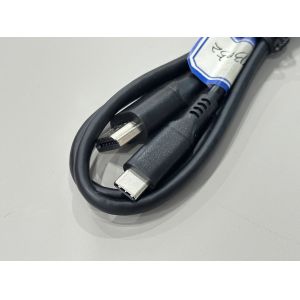
Product Description
This USB Type-C to DisplayPort cable connector is designed for
high-quality video transmission between modern USB-C devices and
DisplayPort displays. The cable uses oxygen-free copper wire and
multi-layer shielding to ensure low-loss, low-jitter electronic
signal transmission, providing clear and stable images at up to
4K@60Hz.
Gold-plated terminals and precision-molded shells improve contact
reliability and mechanical strength, making the cable suitable for
frequent plugging and unplugging in professional environments. The
flexible PVC outer jacket and integrated strain-relief design
protect the internal wire cable and terminals from bending damage
during daily use.
Customization options include different cable lengths, outer-jacket
color, printing, and packaging, allowing integration into OEM
monitors, docking stations, servers, and industrial control systems
where a robust connector solution is required.


| Connector type | USB Type-C male connector to DisplayPort male connector |
| Transmission standard | DisplayPort Alt Mode over USB-C, high-speed digital video signal |
| Resolution support | Up to 4K@60Hz (3840×2160), downward compatible with 2K/1080P |
| Wire structure | Multi-core copper wire cable for high-speed electronic signal
transmission |
| Conductor material | Oxygen-free copper (OFC) |
| Wire gauge | 32–28 AWG (customization available according to length and power
requirement) |
| Outer jacket | Flexible PVC insulation, black |
| Shielding | Aluminum-foil + braid composite shielding, low EMI |
| Connector housing | Molded thermoplastic shell, strain-relief design |
| Contact plating | Gold-plated terminals for stable contact and long life |
| Rated voltage | 5V max signal / auxiliary power |
| Operating temperature | -20°C ~ +70°C |
| Cable length | Standard 1.0 m; other lengths can be customized |
| Application interface | USB-C host device to DisplayPort monitor / projector / docking
station |
| Custom service | OEM/ODM, length, jacket printing, logo, packaging and pin
assignment options |
Applications
Connecting laptops, tablets, or mini-PCs with USB-C video output to
DisplayPort monitors, TVs, and projectors
Office workstations, multi-screen trading or design setups, and
server-room management consoles
Industrial PCs, digital signage players, and embedded systems
requiring reliable high-definition display transmission
Use with docking stations or hubs to expand USB-C ports into
dedicated DisplayPort display interfaces
Precautions
Ensure the USB-C port on the host device supports DisplayPort Alt
Mode; standard power-only or data-only USB-C ports cannot output
video through this connector.
Do not bend the cable sharply near the connector ends; keep the
minimum bend radius to protect the internal wire and terminals.
Avoid routing the cable close to strong power lines or
high-interference electrical equipment to maintain signal
integrity.
Unplug by holding the connector housing rather than pulling on the
cable to extend service life.
Store in a dry, dust-free environment and keep connectors clean to
ensure stable mechanical and electrical contact.